 I've been wanting to experiment with the collage feature of Picnik... and tonight is the perfect time. I took several photos from the parking lot of a local church... and I wanted to use all of them as "the" photo of the day.
You can see the moon and Venus, three sides of a peace pole, and the temperature. I played with some of the features of the collage option. It's fun. And -- even in the free version of Picnik -- you have several choices of how you want to set up your collage.
I chose the background color, added a frame, decided how many photos I wanted to include, the layout, and how "kooky" (tilted) the photos should look. Fun!
Adobe has published a free, web-based, image-editing application. Adobe’s Photoshop Express joins several other image-editors already online. As soon as it became available, I examined it to determine how it compares with the online image-editor that I currently use… and to determine which Photoshop-like procedures I would be able to use with this new application.
I chose not to share my experiences as a tech tip at that point due to the Terms of Service. I was not the one to initially discover that the Terms gave Adobe more control over users’ content than many users would like; however, when I reviewed the Terms, I agreed that they were not what I wanted to accept. Adobe has since modified the Terms and, consequently, I can now recommend the application.
My first reaction was one of disappointment. Since this application is Photoshop Express, I figured I would be able to use layers. However, there are no layers.
As I tried various editing functions, I was surprised to see preview thumbnails of my image. I can click on the different thumbnails to see which result I like best. With some of the editing functions a slider is also available to help me choose my preferred result. The thumbnails help me make my choices.

Another good feature is the ability to undo choices I make… and not necessarily in the order that I originally make those choices! That, too, was a surprise.
Two pages of FAQs provide helpful information when you’re first learning the application. Some of what I learned from the FAQs includes…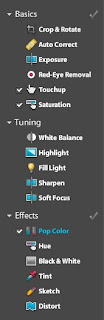
- I can play without an account, but I can’t work with my own photos without an account.
- Photoshop Express currently works only with JPEGs.
- I can upload multiple files at a time from my computer.
- Photoshop Express currently works with Facebook, Photobucket, and Picasa.
- When I upload a photo from my computer, I can select it in My Photos, and then choose to edit it.
- In order to download my edited and saved photo to my computer, I mouse over the photo. That makes the options menu visible and then I can choose to download the photo to my computer.
- Functions that are available include: crop and rotate, resize, auto correct, exposure, red-eye removal, touchup, saturation, white balance, highlight, fill light, sharpen, soft focus, hue, black and white, tint, sketch, distort, and pop color.
Photoshop Express is easy to use. Although some features that I would like are missing—layers, tools for drawing shapes, the ability to add text—some nice features that are included are storage space for photos, the ability to share photos, and slideshow settings for albums.
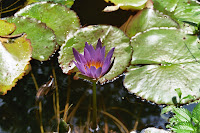
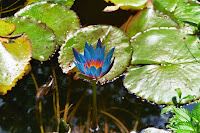 What delighted me was that I can pop color! I can’t do that with my current image-editing application. My purple water lily looks great in blue!
Adobe Photoshop Express web sites…
Adobe Photoshop Express application web site:
http://www.photoshop.com/express
Photoshop Express Support Center (links to FAQs and other support): http://www.adobe.com/support/photoshopexpress/
Adobe Photoshop Express Getting Started (excellent short training videos):
http://www.photoshopexpresstechniques.com/
Check Steve Dembo’s blog, Digital Passports: Your passport to the wide world of Web 2.0!, to read an interesting comparison of Adobe Photoshop Express and Picnik.
Wow! I’ve been testing a Web 2.0 application that’s a winner. Picnik (http://www.picnik.com/) is an online photo-editing tool. It does a very good job and it’s incredibly easy.
You can access photos you want to edit from your computer, from any web site, even Flickr, Picasa Web Albums, and Facebook. You can also email your photos from Picnik.
You can:
• fix underexposed photos,
• crop,
• rotate,
• resize,
• remove red-eye,
• sharpen,
• or apply special effects to your photos.
Because Picnik is an online tool, there is nothing to download and it works on Mac, Windows, and Linux operating systems. I tested the free version, although there will soon be an additional version for a fee. While the company is in beta testing, you can use all features for free. When the beta is completed, basic photo editing will be available in a free version and a premium (fee-based) version will be available with more tools, storage, and content.
The company provides some tools to make it even easier to use Picnik.
• Bookmarklet makes it possible for you to grab an image from any web site.
• The Firefox extension enables you to grab a screenshot of any web site. This could be very useful for handouts or blog posts.
• The Yahoo Widget allows you to upload a photo directly to Picnik by drag and drop.
• It’s easy to take an image from any web site to Picnik in one click in Firefox, Safari, and Explorer.
The company maintains a blog so you know what’s going on and a forum so you can ask for help.
Minimum system requirements are:
• Microsoft Windows XP or Mac OS X
• 1GHz processor or better
• at least 256 MB of RAM
• Internet Explorer version 5.0 or higher or
• Firefox 1.0 or higher.
 I've been wanting to experiment with the collage feature of Picnik... and tonight is the perfect time. I took several photos from the parking lot of a local church... and I wanted to use all of them as "the" photo of the day.


