Adobe has published a free, web-based, image-editing application. Adobe’s Photoshop Express joins several other image-editors already online. As soon as it became available, I examined it to determine how it compares with the online image-editor that I currently use… and to determine which Photoshop-like procedures I would be able to use with this new application.
I chose not to share my experiences as a tech tip at that point due to the Terms of Service. I was not the one to initially discover that the Terms gave Adobe more control over users’ content than many users would like; however, when I reviewed the Terms, I agreed that they were not what I wanted to accept. Adobe has since modified the Terms and, consequently, I can now recommend the application.
My first reaction was one of disappointment. Since this application is Photoshop Express, I figured I would be able to use layers. However, there are no layers.
As I tried various editing functions, I was surprised to see preview thumbnails of my image. I can click on the different thumbnails to see which result I like best. With some of the editing functions a slider is also available to help me choose my preferred result. The thumbnails help me make my choices.

Another good feature is the ability to undo choices I make… and not necessarily in the order that I originally make those choices! That, too, was a surprise.
Two pages of FAQs provide helpful information when you’re first learning the application. Some of what I learned from the FAQs includes…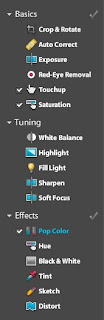
- I can play without an account, but I can’t work with my own photos without an account.
- Photoshop Express currently works only with JPEGs.
- I can upload multiple files at a time from my computer.
- Photoshop Express currently works with Facebook, Photobucket, and Picasa.
- When I upload a photo from my computer, I can select it in My Photos, and then choose to edit it.
- In order to download my edited and saved photo to my computer, I mouse over the photo. That makes the options menu visible and then I can choose to download the photo to my computer.
- Functions that are available include: crop and rotate, resize, auto correct, exposure, red-eye removal, touchup, saturation, white balance, highlight, fill light, sharpen, soft focus, hue, black and white, tint, sketch, distort, and pop color.
Photoshop Express is easy to use. Although some features that I would like are missing—layers, tools for drawing shapes, the ability to add text—some nice features that are included are storage space for photos, the ability to share photos, and slideshow settings for albums.
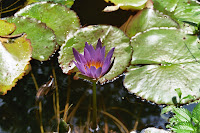
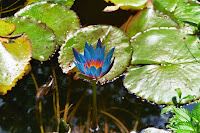 What delighted me was that I can pop color! I can’t do that with my current image-editing application. My purple water lily looks great in blue!
Adobe Photoshop Express web sites…
Adobe Photoshop Express application web site:
http://www.photoshop.com/express
Photoshop Express Support Center (links to FAQs and other support): http://www.adobe.com/support/photoshopexpress/
Adobe Photoshop Express Getting Started (excellent short training videos):
http://www.photoshopexpresstechniques.com/
Check Steve Dembo’s blog, Digital Passports: Your passport to the wide world of Web 2.0!, to read an interesting comparison of Adobe Photoshop Express and Picnik.
 I have found another high quality, web-based, free educational software application. I believe that Kerpoof! (http://www.kerpoof.com/) fits that definition. Kerpoof! is a web-based application that has some capabilities similar to those of KidPix.
With Kerpoof! you can make pictures, stories, and movies. Select a background. Drag clip art onto the scene. Move, rotate, and change the size of the clip art. Even let the clip art automatically change size based on whether you’re positioning it in the front of the scene or farther back.
I read about this product at Steve Dembo’s Digital Passports web site. Steve, a former kindergarten teacher, calls Kerpoof! one of his "new fave’s for lower elementary/early childhood." Kerpoof! works well in grades K-5, although it would probably be used the most in grades K-3.
M. C. Escher used to help me teach geometry. Well, at least his drawings and woodcuts helped me. I found a lesson plan for introducing his work and the concept of perspective with Kerpoof! For the Escher introduction, the lesson plan begins by sharing some information about Escher and his work. Then you use the multiple perspectives scene as your background and place clip art on it so that three different perspectives are represented. The lesson plan then continues with some other activities. It provides a good hands-on introduction. And it was fun!
At Amy Boehman’s web site I saw a suggestion for creating number sentences with different background scenes or creating patterns using the pictures. It also works well with IEPs.
The Kerpoof! web site provides lesson plans, ideas, and a teacher’s page. Training is available through text instructions, a PDF, and short movies. Students can save, print, or email their products. They can share their projects through the web site and they can email them to other students in a Kerpoof! community. Students can create “chat groups” and then work collaboratively with a member of their group to build a scene together. Scenes can be printed for coloring.
Chris Harris at the School Library Journal calls Kerpoof! “one of the most powerful online resources [he has] seen in quite a while.” Chris adds that Kerpoof! has aspects of Storybook Weaver as well as Kid Pix.
Kerpoof! is both kid- and teacher-friendly. It can be used in a variety of ways to help students learn the curriculum. Kerpoof! is accessed through a browser rather than installed on your computer. And it’s free!
My only complaint is that there aren’t both boy and girl clip art people for each scene. I could place a girl from the Nutcracker Suite scene in my Backpack and then pull her out to use in the Starry Night scene, but her clothing (a nightgown) just didn’t fit!
Kerpoof! is intended to be both fun and educational. Suggested uses for the classroom include studying traditional Japanese culture, the life cycle of a caterpillar, food chains, elementary mathematics, writing starters, reading comprehension, impressionist art, metaphors, and cubism art.
You can sign up for an educator’s electronic newsletter. Do be sure to read the Terms and Conditions for using Kerpoof! so you know the rules for displaying Kerpoof! products.
Kerpoof! is fun, free, and easy to use.
Escher-LikePhoto.jpg: http://flickr.com/photos/frielp/2664135/
license: http://creativecommons.org/licenses/by/2.0/deed.en
 As teachers we’re learning to build personal learning networks, but are we teaching our students to do the same? I just viewed a video on Steve Dembo’s Teach42:Education and Technology blog that will help me do that next semester. Check it out here.


